
Built for crews & supervisors

Run the job site from one place.

Hours, tasks, customers, crews, and fleet, without the spreadsheet chaos. Field issues reach the shop the same day. Harbr is built for industrial teams who need clarity, not complexity.
Create free account
app.harbr.ca
Harbr dashboard showing hours, tasks, and fleet

Why teams switch to Harbr

0

hub for hours, tasks, customers, fleet & crews

0min

to spin up a new account

0+hrs

saved per manager each week

  • Less chasing timesheets. More time on the job.
  • One source of truth for who did what, and when.
  • Field issues become shop tasks. Clear handoffs between crews, supervisors, and payroll.
  • Departments and companies under one roof—without losing visibility.

Everything your operation needs

Hours, tasks, customers, crews, and fleet are available today. Materials tracking is on the roadmap. Priced as a simple add-on when it lands.

Hour tracking
Available
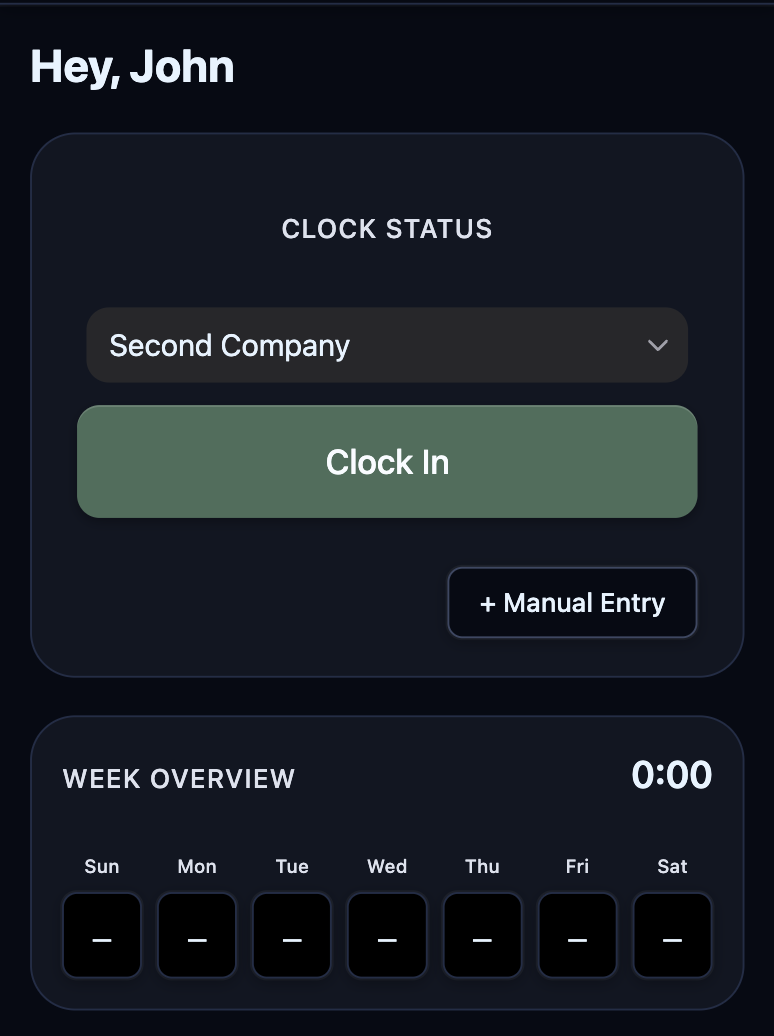
Harbr time tracking screen
  • Employees track hours across multiple companies or departments.
  • Supervisors monitor hours with an audit log of employee actions.
  • Payroll pulls a pay period for everyone. No need to wait for the supervisor.
Task management
Available
Harbr weekly task board
  • One-off, daily, weekly, bi-weekly, and monthly tasks.
  • See which teammate completed each task and when.
  • Bulk add tasks from spreadsheets.
Crews

Paid add-on with a 14-day free trial

Available
  • Create named crews and manage membership in Settings.
  • Assign tasks to a crew on the task board.
  • Designate a shop crew to receive maintenance work automatically.
Customer management
Available
  • Customer accounts tied to your companies, with notes in one place.
  • Manage multiple locations per customer.
  • Create or link tasks to a location—work shows on the task board.
  • Completed work rolls into service history per site.
Fleet & maintenance
Available
Harbr fleet vehicle list with compliance alerts
  • Vehicle registry with make, model, plate, VIN, and active status.
  • Registration, safety, and insurance document uploads with valid-until dates.
  • Expired and expiring-soon highlights so renewals stay visible.
  • Drivers report issues with photos; the shop crew gets a task.
Materials tracking
Coming soon
  • Stockpiles with additions and withdrawals.
  • Crew logs changes; managers see when to reorder.

Live in about two minutes

No sales call required. Create your workspace and invite your crew.

  1. 1

    Create your organization

    Name your company and pick a timezone.

  2. 2

    Invite your first users

    Four users are included. Add more as you grow.

  3. 3

    Start tracking

    Log hours, add customers and locations, assign tasks, set up crews, add vehicles, and report field issues.

Simple pricing

Monthly subscription. No surprise tiers for seats.

Included every month
4

user seats — free, every month

Enough to pilot Harbr with a supervisor, payroll, and two crew members.

Task management is included with every organization—no add-on fee.

Additional seats

$1per user / month

Billing is in USD.

Feature add-ons

Flat monthly add-ons per organization. Turn on only what you need.

  • Crew management

    $9 per month·14-day free trial

    Available
  • Customer management

    $9 per month·14-day free trial

    Available
  • Fleet management

    $5 per month·14-day free trial

    Available
  • Materials tracking

    $5 per month

    Coming soon
Start with 4 free seats

Harbr on your phone—install the PWA

Harbr runs in the browser and installs like an app on iOS and Android. One codebase, offline-friendly workflows where supported, and updates without an app store delay.

We’ll highlight the steps that match your browser.

Harbr installed on a mobile home screen
Chrome / Android / Chromium
  1. Open Harbr in Chrome on your device.
  2. Tap the menu (⋮) and choose “Install app” or “Add to Home screen.”
  3. Confirm the install—Harbr opens from your home screen like a native app.
Safari on iPhone or iPad
  1. Open Harbr in Safari (install requires Safari on iOS).
  2. Tap the Share button, then scroll and tap “Add to Home Screen.”
  3. Tap “Add”—launch Harbr from your home screen icon.
Desktop Chrome or Edge
  1. Open Harbr in the browser.
  2. Look for the install icon in the address bar (or use the browser menu).
  3. Choose “Install Harbr” to get a dedicated window and quick launch.

Ready to get organized?

Create your account, invite your team, and ship the first week of clean data.